Evaluating a workflow
A workflow is a policy: decisions sort products into groups, and actions price each group. Workflow evaluation is the before-picture. Before anything is published, it answers two questions from your own sales history: what would this policy do to the money, and do its decisions matter?
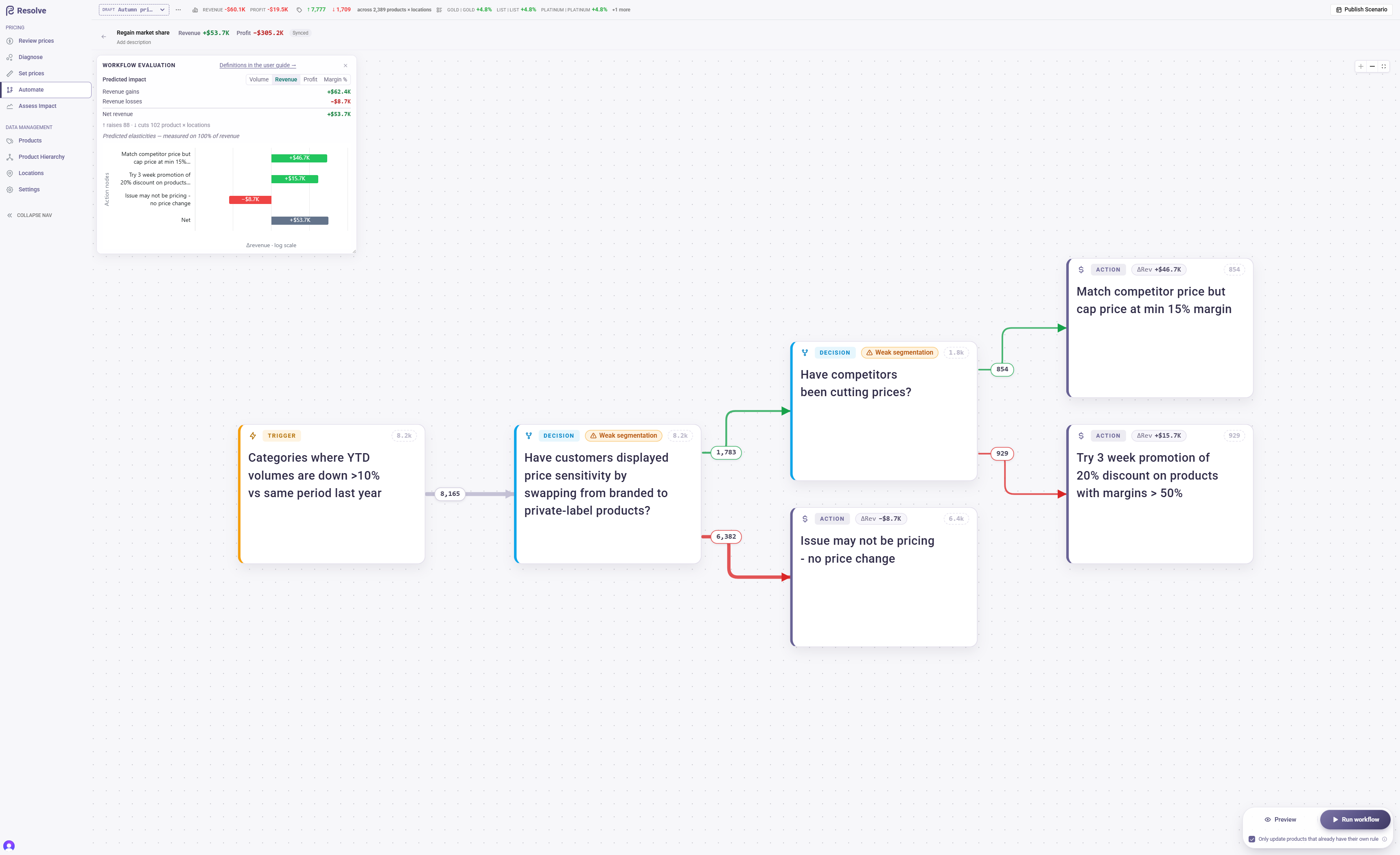
Scores refresh automatically whenever you Preview or Run the workflow, computed against the products each action captured in that run. They appear in the Workflow evaluation panel at the top-left of the canvas (collapse it out of the way, or drag its corner to resize), on the nodes themselves, and in each node's drawer.
The predicted impact
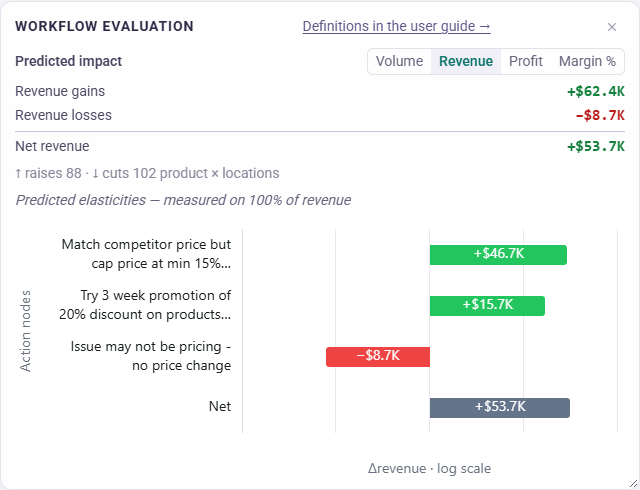
The panel reads like a long subtraction: the actions predicted to gain, minus the actions predicted to lose, equals the net — what the policy as a whole is expected to do.
- The metric toggle switches the panel between Volume, Revenue, Profit and Margin %. Money and volume read as sums; margin reads as levels, because percentages don't add.
- The chip on each action node shows that action's predicted ΔRevenue; click any chip to switch every action to ΔProfit, and click again to switch back.
- The price-move line ("↑ raises 1.2K · ↓ cuts 340 product × locations") counts price directions, so a policy that cuts prices yet gains revenue reads as what it is, not as a contradiction.
- The mode line says how volume was predicted: from measured elasticities on a share of revenue, or — while your catalogue has no estimates yet — volume held flat.
- The bar chart gives each action its own signed bar, gains to the right and losses to the left, down to the closing net bar. Bar lengths are compressed so one big move cannot flatten the small ones; the printed numbers are always the true figures. An action that no product reached still has its row, marked no impact, so every action in the workflow is accounted for.
- The headline beside the workflow name repeats the two money totals — Revenue and Profit, green for a gain and red for a loss — so they stay in view with the panel closed.
Where the prediction comes from
Every estimate is anchored on your trailing twelve months of actual sales — the same anchoring measuring results uses. For each product × location an action would re-price, Resolve takes the proposed price change, asks how strongly that product's volume answers a price change (its own estimated elasticity where one exists, otherwise its group's average, otherwise volume held flat), and scales the actuals accordingly.
A product the tree sends to two different actions, or one carrying contradictory instructions, is excluded and counted — never resolved by silently picking a winner. So is a product with no usable cost.
Action nodes
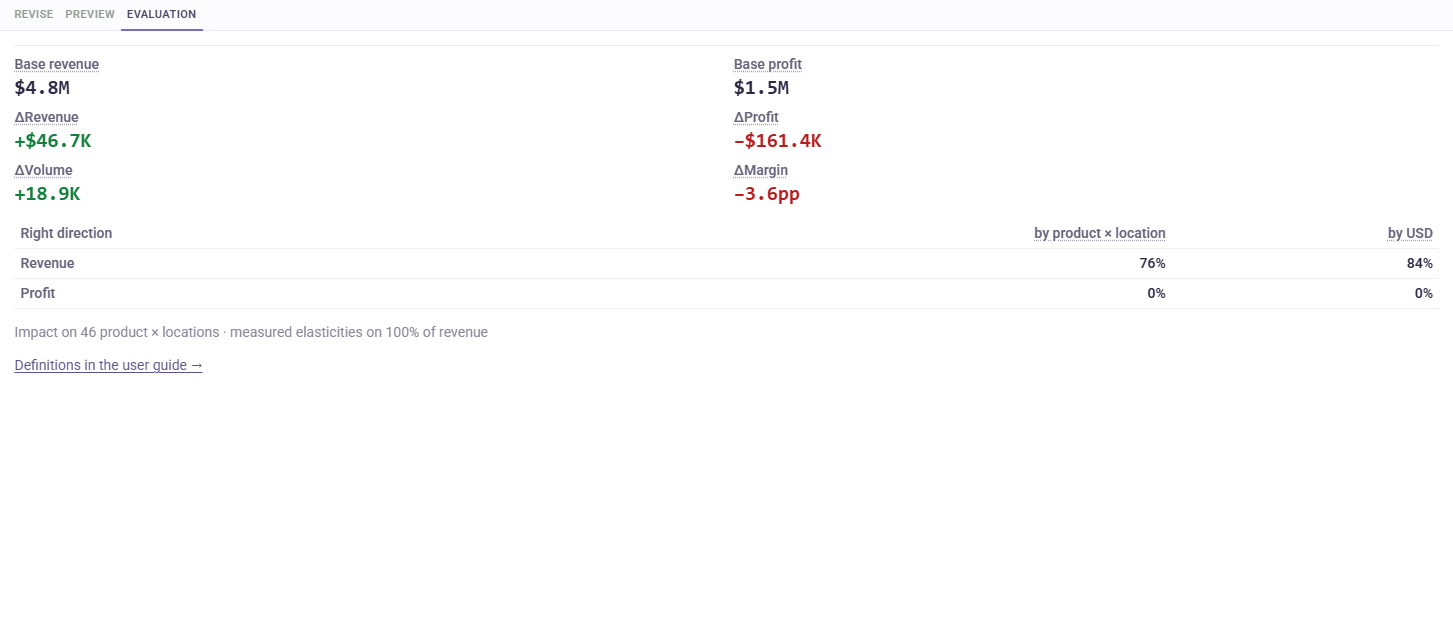
Select an action and open the Evaluation tab in its drawer. The tiles start with what the deltas are measured against — Base revenue and Base profit, the trailing twelve months of the products that action priced — and then carry the predicted deltas: ΔRevenue, ΔProfit, ΔVolume and ΔMargin. A +$41K means one thing on a $200K base and another on $20M. Beneath them a small Right direction table says how evenly the prediction is spread, one row for revenue and one for profit:
- by product × location — the share of priced product × locations whose revenue (or profit) is predicted to rise;
- by your currency (the header names it — by USD, by EUR) — the share of today's revenue (or profit) those product × locations carry.
A high delta with a low right-direction share means the total rides on a few products while the rest are predicted to lose — the signal to split the node, or to move less. Products that did not move are left out of the shares (a zero move has no direction). When the catalogue has no elasticity estimates at all, the table shows dashes: with one imputed sensitivity for every product, all of them would agree by construction, so there is nothing to assess. Each header explains itself on hover; the long form is in the glossary.
Which elasticity was used for a product?
The Preview rows of a decision or an action answer this product by product, in two columns:
- elasticity used — the figure the prediction above was built on for that product × location;
- elasticity source — where it came from:
- own estimate — the product × location has an elasticity of its own;
- this node's average — it has none, so it takes the average of the products in the same node that do (weighted by their revenue);
- average of "another node" — nothing in its own node has an estimate either, so it takes the nearest node around it that has one, named in the cell — up to the trigger, which is the whole workflow's average;
- none — volume held flat — no estimate anywhere: the prediction moves that product's revenue by the price change alone, and the figure beside it reads 0.00.
Both columns are blank for a product without its own estimate until the workflow has been previewed as it stands now: the averages belong to a specific evaluation, and Resolve does not borrow them from an older tree.
Adding your own attributes, and exporting a node
Above the Preview rows of a decision or an action, the Attributes strip lists your user-defined attributes. Switch one on and it becomes a column of the rows — sortable and filterable like the rest — and stays on as you move between nodes and workflows.
The rows show the first 50 products of a node. Export CSV downloads all of them: product, location, the branch each took (decisions) or the prices written (actions), the elasticity used and its source, and the attributes you switched on. It exports the population the last Preview built, so a node edited since asks for a Preview first.
Decision nodes
Each decision's score lives in its drawer, in the Segmentation quality strip above the Preview rows. The strip's header always shows the score; click it to fold the breakdown away or bring it back.
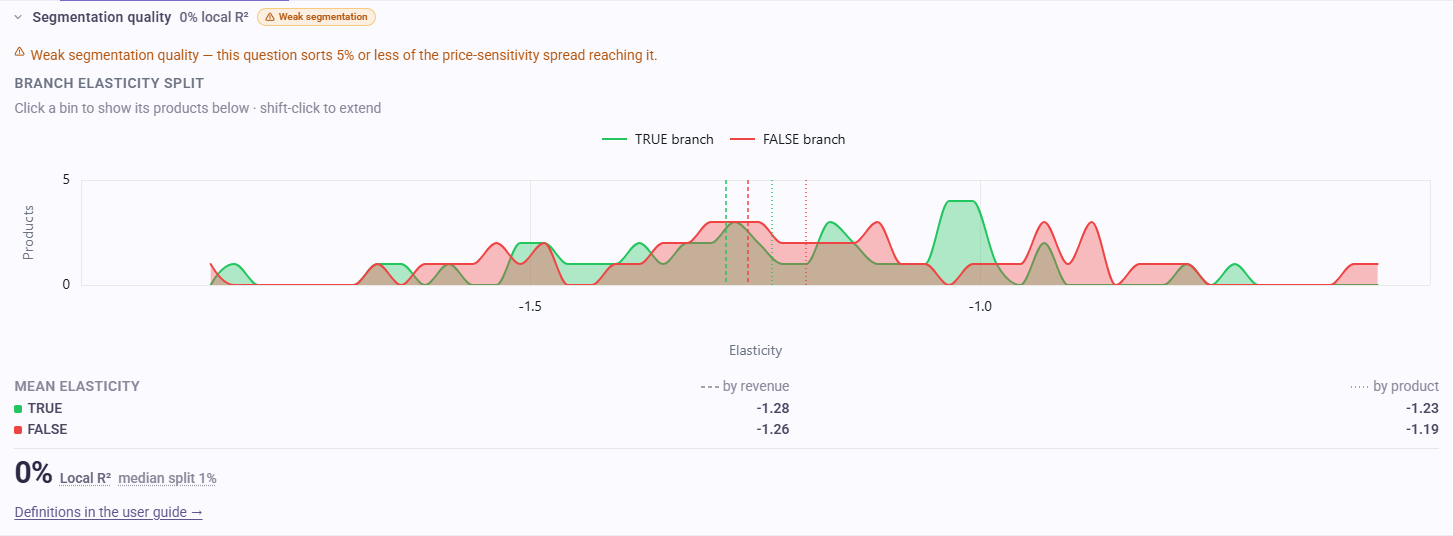
A decision node shows its local R² — how much of the price-sensitivity spread arriving at that node its question sorts — beside the tree's median split as a yardstick, and the elasticity distribution of its TRUE and FALSE branches. Local means exactly that: each node is measured against its own mix, so the scores do not add up across the tree and there is no tree-level total to chase.
The chart is also how you get to the products. Click a bar of the distribution and the Preview rows underneath narrow to the products in that elasticity range — both branches, each row marked TRUE or FALSE — so you can see what sits in a region of the graph and work out how to tell those products apart. Shift-click extends the selection to neighbouring bars; click inside the shaded band, or remove the elasticity filter chip, to clear it.
On the canvas, a decision whose question sorts 5% or less of its mix carries a Weak segmentation badge; every other decision shows no score on the canvas at all — the number lives in the drawer and on hover.
A strong decision separates products with materially different behaviour. A weak decision may still be right for policy reasons (contractual tiers, brand rules); the score says the data doesn't distinguish the groups — only you know whether the business does. A weak tree overall suggests the trigger population is too uniform to need branching, or should be segmented on a different attribute.
How fresh are these numbers?
The panel always shows the latest completed evaluation. When that evaluation and the present diverge, a Preview button appears at the foot of the panel with one line saying why — press it to rebuild the populations and re-score the tree:
- The workflow changed after this evaluation — the scores describe an older tree.
- A newer evaluation failed (or was skipped) — the figures shown are from an earlier run.
Live shows no prediction: the panel, the node figures and the drawer's Evaluation tab belong to draft scenarios, where a policy can still change. Once a scenario is published, the forecast made at publish and what actually happened meet on Publish history.
Preview after every structural edit
Evaluation refreshes with every Preview, so it costs nothing to check. Re-preview after each meaningful edit and read two numbers together: the net prediction (did the money move the way you intended?) and the right-direction shares (does the gain come from most products, or a handful?).
Frequently asked questions
I edited the workflow but the numbers didn't change. Why?
The panel is a record, not a live calculator: it shows the latest completed evaluation. Until you preview again, it keeps describing the tree that last ran — and warns you so.
Why do these figures disagree with the Assess Impact page?
They answer different questions from different inputs. Assess Impact covers the whole scenario — every rule change from every workflow and manual edit — under one price sensitivity you choose on its slider. Workflow evaluation covers this workflow's actions only and uses each product's own estimated sensitivity. Expect them to agree in direction, not to the pound.
Why is the decision score shown as a dash?
Either your catalogue has no elasticity estimates yet (the prediction runs volume-flat, and decision scores wait until estimates arrive), or every product reaching that node currently shares the same estimate, so there is nothing for its question to sort. Both mean "not applicable yet", not a failing grade.
Why are some products missing from the prediction?
A product is left out — and never guessed at — when the tree routes it to two different actions, when it carries contradictory pricing instructions, or when it has no usable cost on record.
When the structure is sound and the net reads the way you intend, run the workflow, review the result in a scenario, and publish. Once the run is live, measuring results takes over with real sales.