Workflows
Automate is where pricing policy becomes something you run, not something you remember. A workflow is a decision tree that prices part of your range: it selects a population of products, routes them through business conditions, and emits a price change for each one — consistently, at any scale, with every decision recorded.
Anatomy of a workflow
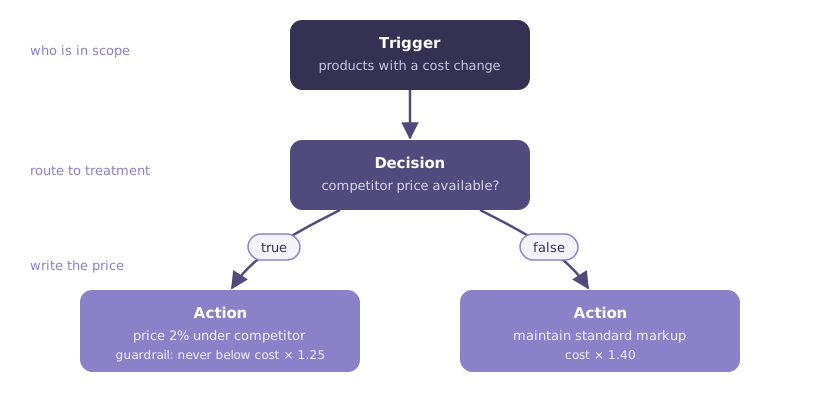
- Trigger — defines who is in scope: the population of product × location rows the workflow prices. "All live products", "products whose cost changed this week", "everything in Bakery below 20% margin" — any criteria over your products, attributes, sales, and current prices.
- Decisions — route products down different branches. Each decision asks a question ("Is a competitor price available?", "Is this an A-class product?") and sends each product down its true or false branch toward different treatment.
- Actions — the leaves of the tree, where prices are written: set a markup, a fixed price, or an adjustment, per segment. Actions can carry guardrails — "never below cost × 1.25" — applied as part of the action itself.
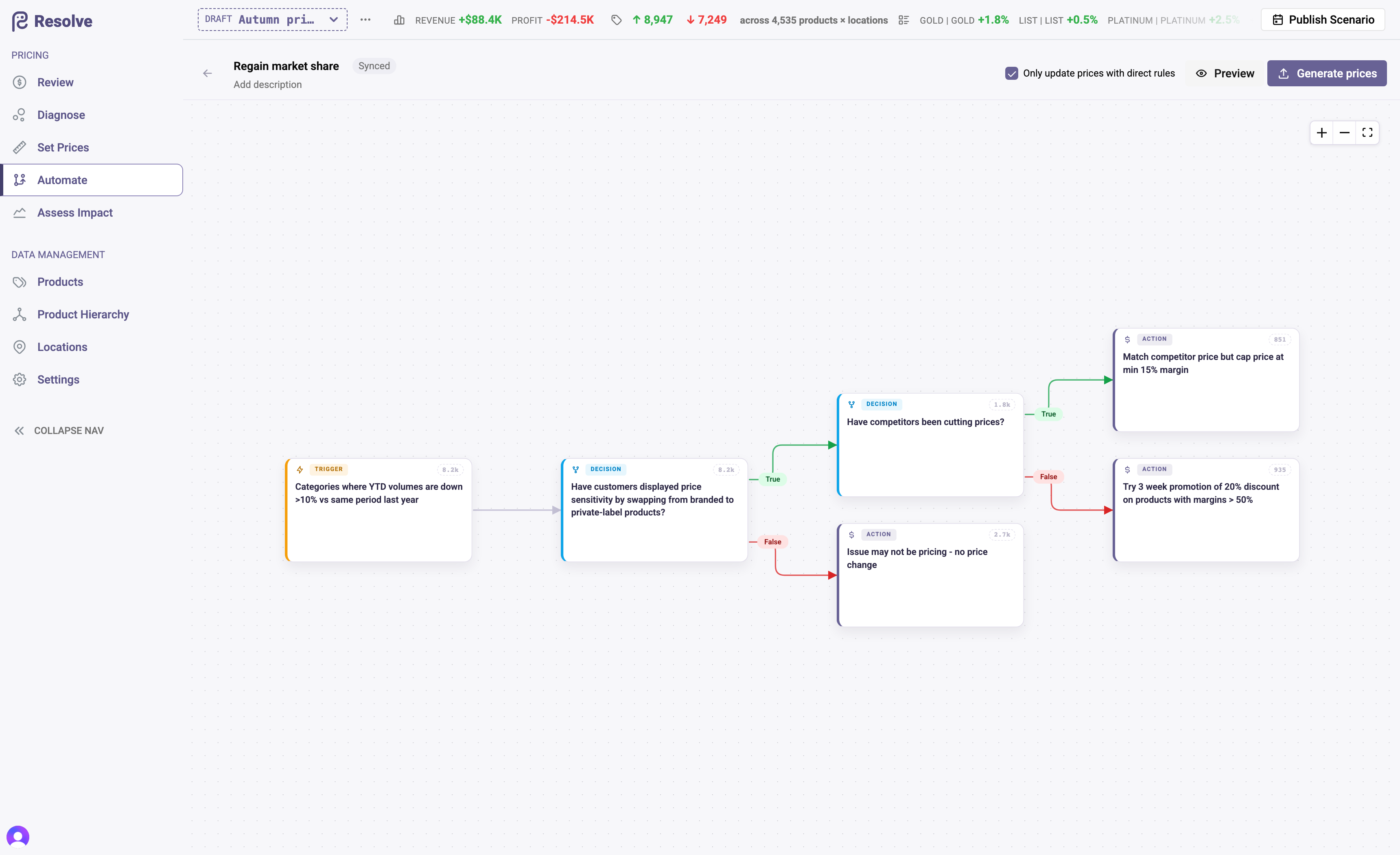
The example above — the demonstration dataset's Regain market share workflow — targets categories where year-to-date volumes are down more than 10%, asks whether customers are switching to private label and whether competitors have been cutting prices, then either matches the competitor (capped at a 15% minimum margin), runs a three-week 20% promotion on high-margin products, or concludes the issue isn't pricing and leaves prices alone.
Preview, then run
-
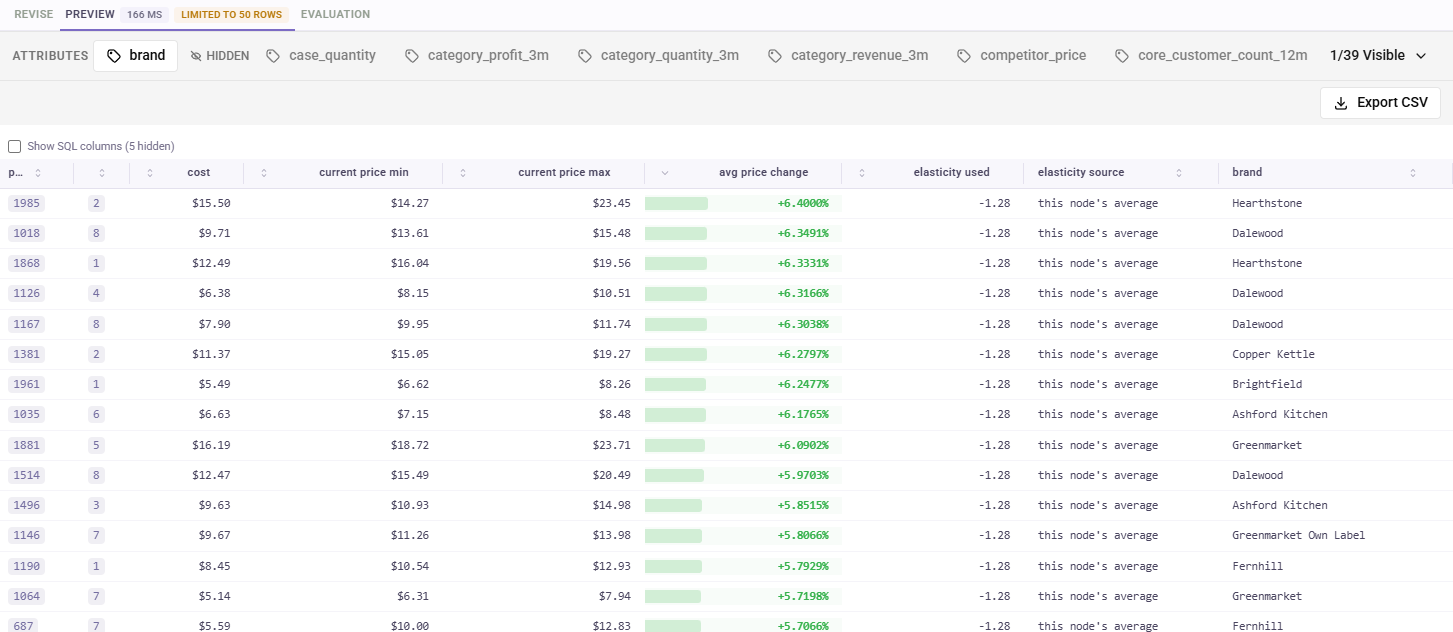
Preview computes the population flowing through every node — how many products take each branch, with samples — without writing a single price. Use it to sanity-check scope and branch logic while you build. Each node's drawer shows its sample as a grid: a decision lists product, location, elasticity and the branch each row took; an action lists product, location, cost, the current price range across the segments it prices, the average price change it would make and elasticity. Both say which elasticity the prediction used for each row and where it came from, and Show SQL columns reveals the columns your own SQL projects. The Attributes strip above the grid adds your own attributes as columns, and Export CSV downloads the node's whole population. Click a heading to sort, and use the filter icon beside it to narrow the sample — a filter searches the node's whole population, not just the fifty rows on screen, and each active filter shows as a chip above the grid. Drag a heading's edge to widen a column.
-
Run workflow runs the workflow for real within your scenario: every product that reaches an action gets its price rule written. A confirmation says what the run will do before anything is written. Nothing touches Live — the output lands in the scenario like any other draft change, ready for Assess Impact and the Review grid.
A progress bar takes the button's place while prices are generated; the run carries on on the server if you leave the page. Hover Run workflow to see where you stand — not yet run, generated prices matching the latest workflow, or older prices from before your last edit. Editing is locked while a preview or run is in progress, and a run waits for unsaved logic edits to be saved or cancelled. Re-running a workflow in the same scenario replaces its previous output — a workflow's result is always one coherent set.
What a run writes
Every price a workflow writes is attributed to it: the Review grid shows the workflow as Source of Change, the terminal action as Action Executed, and the full decision path per product.
Two precedence guarantees keep automation safe around hand pricing:
- Manual rules win. In a scenario, any hand-set rule owns its product × location × segment scope — workflow runs skip it entirely.
- Family alignment holds. Workflows price family heads; members are aligned to the head's price automatically.
Building and running
Workflows are created on the Automate page with New Workflow, or by duplicating an existing one. The workflow assistant then builds the tree with you node by node from plain-language descriptions — see Building a workflow. The canvas handles layout automatically and saves as you edit. On Live, workflows are read-only: switch to a scenario to change or run one.
Workflows run when you run them — they are repeatable, not scheduled. The operating rhythm is: costs or market data land → run the workflow in a fresh scenario → assess impact → review → publish → measure the results.
One policy per workflow
Keep each workflow answerable in one sentence — "maintain tier laddering", "match competitor on KVIs", "protect margin floor after cost increases". Small, named policies compose better than one monolith, and the Review grid's attribution stays meaningful.