Hierarchy & inheritance
Your catalogue in Resolve is organised as a product hierarchy — for example Category → Line → Product in the demonstration dataset. The hierarchy is more than navigation: it is the backbone of pricing, because rules set on a hierarchy level inherit down to everything beneath it.
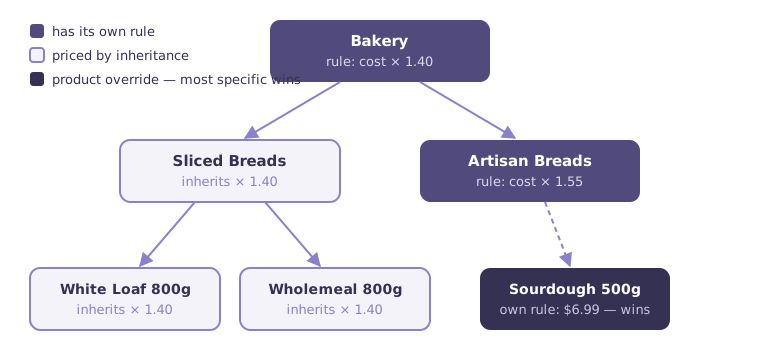
Set once, price many
A markup rule on the Bakery category prices every bakery product that doesn't have a more specific rule of its own. That single rule might govern hundreds of products — and it keeps governing products you add to the category later.
The most specific rule wins
When several rules could apply to a product at a location and segment, Resolve resolves them by specificity:
- A rule on the product itself beats any rule on a group above it.
- Between group rules, the deepest level wins — a rule on Artisan Breads beats a rule on Bakery.
- If two rules sit at the same level, the one with the latest effective date wins.
This makes exceptions cheap. Price the category once, then override the handful of products that need special treatment — each override is one rule, and removing it lets the product fall back to its group price.
A not offered rule participates in the same cascade: placed on a product or group, it blocks inherited coverage and takes the range off sale in that scope.
Where you manage the hierarchy
The Product Hierarchy page (under Data Management) is where you define levels, create groups, and organise products — by dragging them between nodes, individually or in bulk. See Managing data.
Think in coverage, not in prices
The practical skill with inheritance is choosing the level at which a pricing decision belongs. Margin policy usually belongs high (category or line); competitive responses and price points belong low (product). The Review grid always shows you which rule actually produced each price, so you can verify coverage at a glance.
Next: the customer dimension — Customer segments.