ERP & data exchange
Resolve usually sits upstream of an ERP or point-of-sale system that has its own price-setting capability. Prices flow out of Resolve on publish — and, in most estates, prices can also change in the ERP directly: a manager overrides a price, a publish is refused or edited before it takes hold, a scheduled change is cancelled. Resolve is built for that reality.
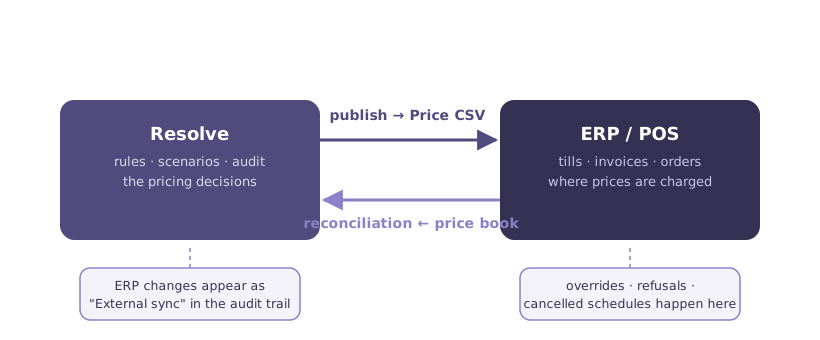
Prices out: publish and export
The outbound path is covered in Publishing & exports: publish carries a scenario onto Live, and the Price CSV export delivers the resulting specific prices for your ERP or POS to ingest.
Prices back: reconciliation
Reconciliation is the inbound path: your ERP exports its current price book as a file, and Resolve converges its Live rules on it. After a reconciliation, Resolve's book matches the ERP's reality — and every price the ERP changed is visible as External sync in the Review grid's Source of Change column, so drift is seen, not silent.
Reconciliation is precise about what it touches:
- The file is authoritative for the territory it covers — the segments and locations it asserts. Within that territory, new ERP rules are added, differing ones are updated, and Resolve-side rules the ERP no longer carries — including scheduled changes the ERP cancelled and publishes the ERP refused — are removed. A partial file cannot wipe the wider book: nothing outside its territory is touched.
- History is never rewritten. Expired rules and price history stay intact; reconciliation converges the present and the future, not the past.
- Timing tolerances are built in. Price timing matches at the minute, so an ERP echoing a price back with second-level drift still matches the rule it means, rather than creating a spurious duplicate.
- External changes are not protected the way manual ones are. A reconciled ERP price stands until your next workflow run or manual edit takes ownership back — automation is free to re-price it.
Reconciliation runs against Live on a schedule you control — typically nightly, after the ERP's own batch processing.
Bulk data in
Alongside the onboarding imports, Resolve accepts recurring bulk loads — cost updates, attribute refreshes, catalogue changes, and additive price-rule uploads (which supplement the book rather than converging it; reconciliation is the only path that removes). Bulk paths validate before committing, and bulk-loaded rules carry the same attribution and audit trail as everything else.
Working with your integration team
File formats and scheduling for reconciliation and bulk loads are typically set up once with your ERP or integration team during implementation. The Resolve team provides the field specifications.