Scenarios & Live
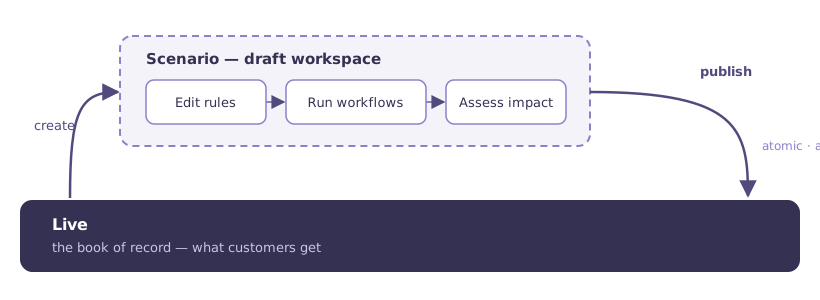
Live is the book of record — the prices your customers actually get. A scenario is a draft workspace layered on top of it: a safe place to make changes, run automation, and measure impact before anything reaches a customer.
How scenarios work
Create a scenario from the toolbar at the top of any pricing page — give it a name, a description, and a default rule valid-from date (when its changes should take effect once published). From then on, everything you do while that scenario is selected — grid edits, workflow runs, hierarchy changes, new segments — belongs to the scenario, and Live is untouched.
Switching between Live and a scenario is one click in the toolbar. Live is always read-only-badged so you can't mistake where you are. While a scenario is selected, the toolbar continuously shows its impact summary — the revenue and profit change versus Live, and the average price movement per segment.
What is drafted in a scenario:
| Data | Versioned in scenarios? |
|---|---|
| Price rules, segments, product hierarchy | Yes — scenario-scoped until publish |
| Products, locations, attributes (master data) | No — global, shared by Live and every scenario |
Master data is always global
Pages under Data Management edit global data. A cost or product change there affects Live and every open scenario immediately — the toolbar switches to an explicit warning banner on those pages to make this unmissable.
Publishing
Publish Scenario carries the scenario's changes onto Live in one atomic step: every rule the scenario holds overwrites its Live counterpart, and Live rules the scenario never touched are left standing. Publishing adds and overwrites — it does not clear the book.
Publishing is deliberate: a confirmation dialog spells out what will be copied, and asks you to type a confirmation word. Once published, the scenario has done its job and is retired — its changes now are Live, its resolved prices are recorded in price history, and every change keeps its original author in the audit trail.
There is no limit on concurrent scenarios: different team members can work in different scenarios at once, and each publish is all-or-nothing for its own scenario.
Choosing what to publish
If a scenario contains more changes than you want to release, you can trim it before publishing: export the scenario's changed prices, remove the rows you don't want, and apply the remainder as the scenario's keep-set — everything omitted reverts to its Live price. See Publishing & exports for the details and the edge cases that follow from the pricing model.
Next: products that must share a price — Product families.