Assessing impact
Before a scenario's prices reach anyone, Assess Impact quantifies what they would mean: the revenue and profit change had the new prices applied to the last twelve months of your actual sales. It appears in the menu whenever a scenario is active.
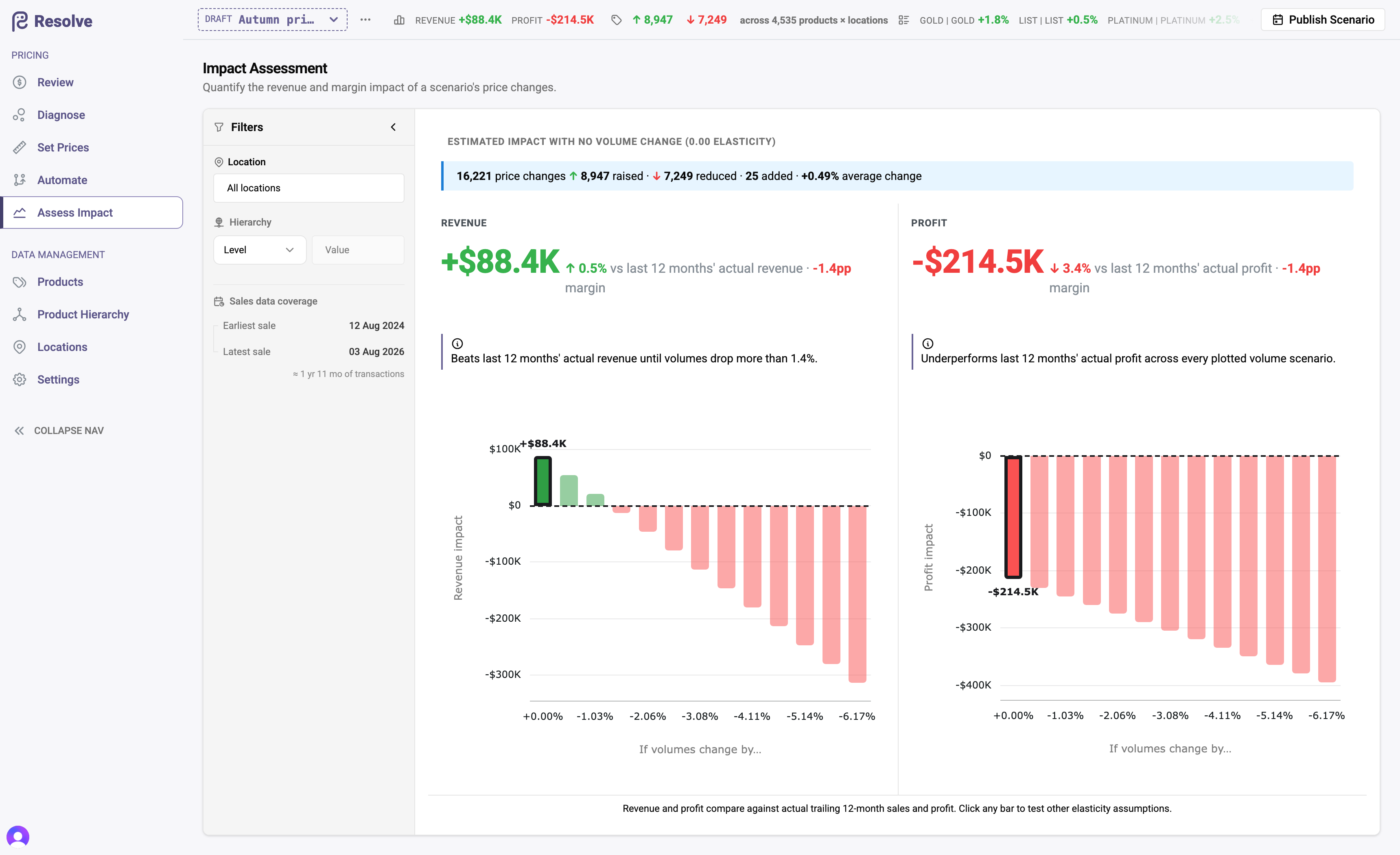
What it shows
- Revenue and profit deltas — scenario versus Live, computed against actual sold volumes: every unit you sold in the last twelve months, repriced at the scenario's prices.
- Four bars per metric, one per assumption about volume. No volume change is the pure price-and-cost arithmetic with no model in it. Predicted applies each product × location's own estimated elasticity — the headline when the scope has any. More inelastic and more elastic move every estimate one standard deviation in the same direction at once: a "what if the model is systematically off by this much" scenario, not a confidence interval. Click any bar to read its breakdown; the page comes back to the prediction.
- Behind the prediction — how much of the scope carries its own estimate (the rest take the scope average), how uncertain those estimates are, and which rule sources the impact comes from.
Filter all of it by location, hierarchy level, or a specific category to see where the impact concentrates — a scenario that is flat overall may hide a significant giveaway in one category funded by increases in another.
The always-on summary
You don't need to open the page for the headline: whenever a scenario is selected, the toolbar shows its running impact summary — revenue and profit change versus Live and average price movement per segment — updating as you edit. Assess Impact is the drill-down when a number in that summary raises an eyebrow.
Impact reads history, not the future
The twelve-month baseline answers "what would last year have looked like at these prices?" — a factual, assumption-light comparison. It deliberately does not model competitor response or demand shifts beyond the quantity estimate you control. Treat it as the floor of your understanding: precise about the mix you actually sold, honest about what it doesn't predict.
Make impact review a publish gate
The toolbar summary makes it cheap to glance at impact after every meaningful edit; the page makes it cheap to justify a scenario in a pricing meeting. Teams that require an impact screenshot in their publish sign-off catch giveaway errors before customers do.
Once the result passes review, follow the publishing workflow to carry the scenario to Live. And once those prices have been live for a few weeks, Measuring results puts what they actually did next to what this page predicted.