Measuring results
Workflow evaluation predicts what a policy will do before it prices anyone. Assess Impact predicts what a whole scenario would mean before you publish. Publish history answers the question both of them lead to — what did that decision actually do? — after the fact, from real sales. It reads only what reached Live: draft scenarios have predictions, not history.
Finding your runs
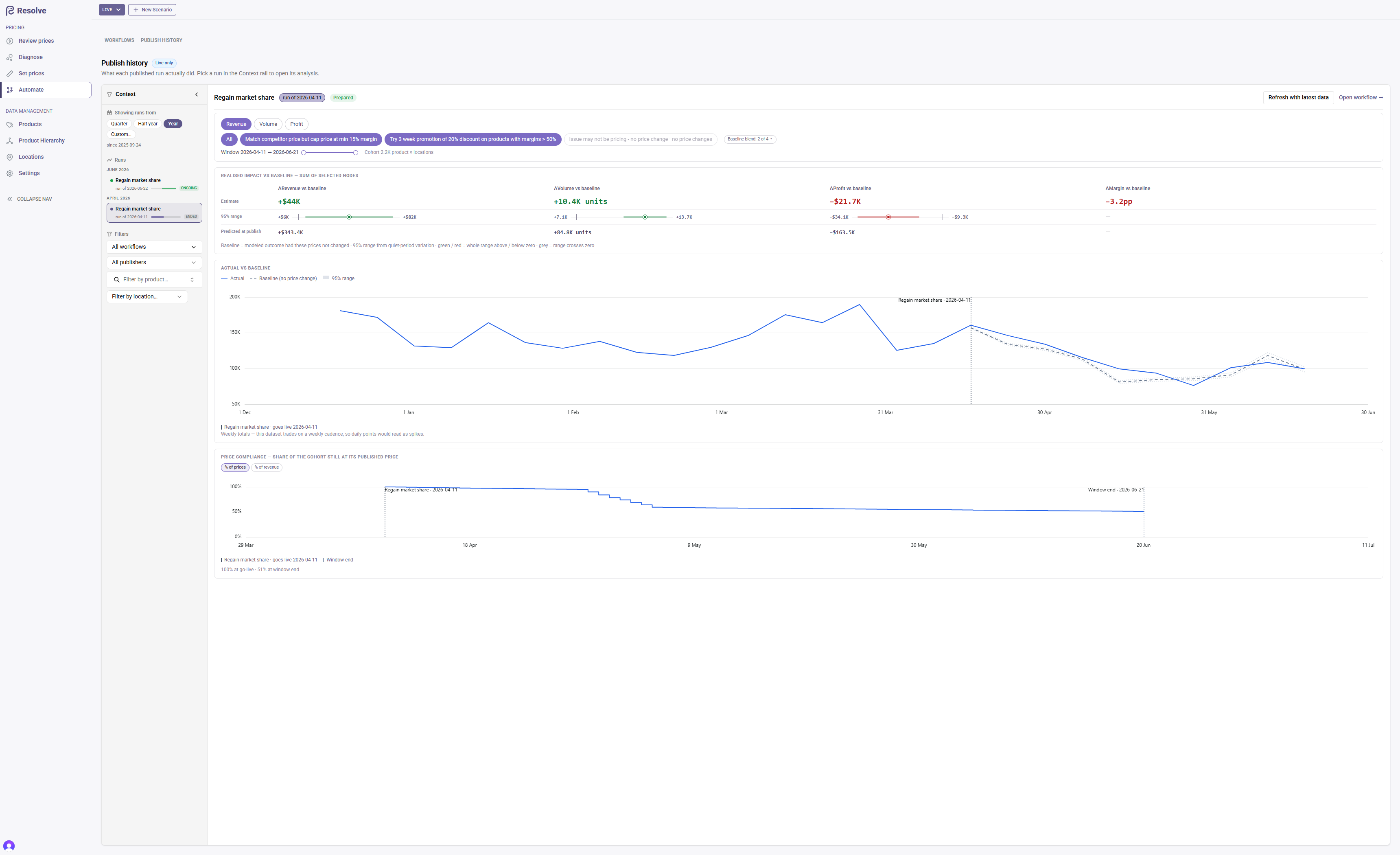
Open the Publish history tab on the Automate page. The Context rail on the left lists every published workflow run whose prices were live in the chosen period; the analysis opens on the right when you click one.
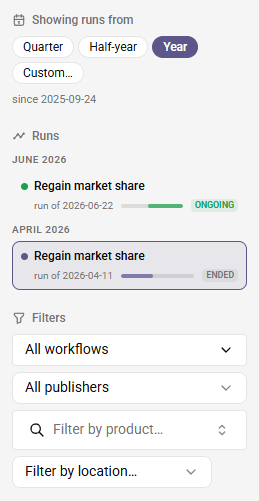
- Showing runs from — the rail shows runs that were live in the chosen period: the last three months by default (Quarter), the last six (Half-year), the last twelve (Year), or Custom dates.
- Runs — one row per run, grouped by the month it went live, newest first. Each row carries the workflow's name, the run date, a bar spanning the days its prices have been live, and an ongoing, ended or scheduled tag (prices that go live on a future date). Hover for who published it, how many of its prices went live and are still live, and whether its analysis is prepared.
- Filters — narrow the list to specific workflows, a publisher, or a single product or location.
The page's address remembers the selected run and the rail's filters, so a link pasted into a pricing meeting's notes reopens the same run. The metric, actions, baseline blend and window open at their defaults.
Scope: actions, baseline, metric, window
The header names the workflow and run date and says whether the run is Prepared. The first time you open a run, Prepare analysis builds it in one click; after that the same button reads Refresh with latest data and takes in the sales and costs that arrived since.
The scope controls sit right under the header, because they decide what every number below means.

- Metric — revenue, volume or profit, the row of pills that leads the block; the chart below follows it.
- Nodes — one pill per action, shown when the run has more than one. All is the default; click an action to leave it out and click it again to bring it back — at least one action always stays selected. An action that published no price changes in this run is listed greyed as no price changes, so every branch is accounted for.
- Baseline blend — each comparison group's fitted weight. Deselect one to see the figures without it; a group the data cannot support shows as unavailable.
- Window — measurement starts at go-live and, by default, ends the day before the next decision — a later run re-pricing any of these products, or a single day of manual changes to at least half of them — or the day before price compliance fell below half, whichever comes first. Drag the slider past either bound to keep measuring; a note beside the dates names the bound in play.
The verdict, then the evidence
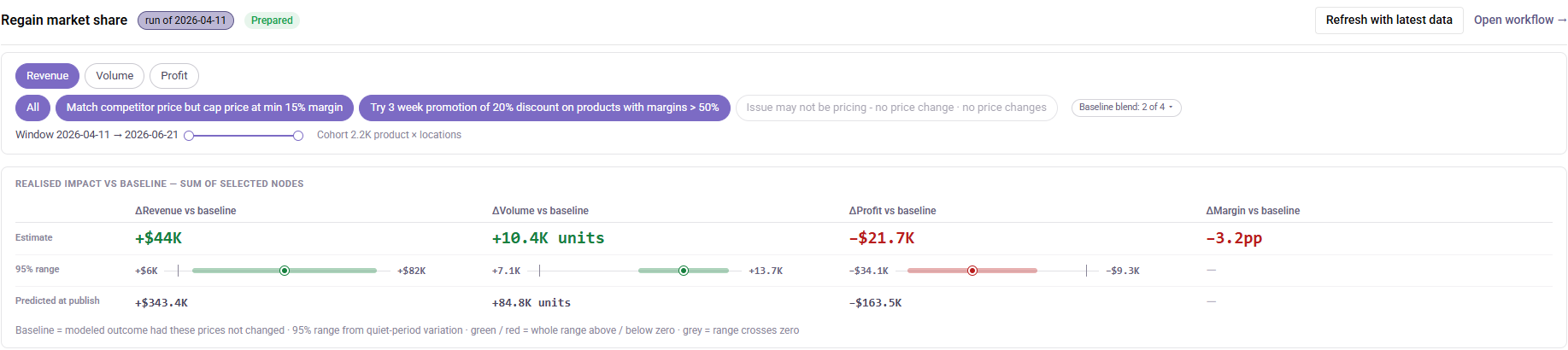
The analysis leads with its answer: a Realised impact table with a column each for ΔRevenue, ΔVolume, ΔProfit and ΔMargin, versus the baseline, summed over the selected actions for the measurement window. Read it row by row:
- Estimate — the measured effect.
- 95% range — the low and high ends within which the true effect sits with 95% confidence, given the swings that appear in comparable periods with no price change. The bar between them draws the range, the dot marks the estimate and the small tick marks zero, so you can see at a glance whether the range crosses it.
- Predicted at publish — what was forecast for the same actions when the run went live, level with the outcome in every column.
The colour of each estimate is its verdict:
- Green — even the low end is above zero: a gain that normal variation does not explain.
- Red — even the high end is below zero: a loss that normal variation does not explain.
- Grey — the range crosses zero: the effect cannot be told apart from normal variation.
Two more reading rules keep the table honest:
- An em dash for profit means unmeasured — no day in the window has cost data on both sides of the comparison. Unmeasured is never shown as a confident zero.
- A partial-sum label ("sum of 3 of 5 selected nodes") flags that some selected actions had no measurable window.
The baseline
Every number on the page is actual minus baseline: what the cohort really did, minus a model of what it would have done had the old prices stayed. Resolve blends that model from up to four comparison groups — the cohort's own preceding period, the same cohort last year, the same products in unaffected locations, and sibling products the run didn't touch — weighted to reproduce the cohort's behaviour over the thirteen weeks before go-live, right up to the day the prices changed. For revenue and profit, the baseline prices each product at what its customers actually paid before go-live — every segment, discount and promotion, exactly as the actual side counts them — counting only the days within those thirteen weeks on which the product's old price rule was already in force, and moved only by the cost changes that rule would have passed on.
The baseline's uncertainty is the 95% range in the table: it is measured by rerunning the same model on pre-launch periods where nothing changed, and it widens as prices are overridden, because a smaller basket of products averages out less noise.
Only prices this run still owns are measured. From the day any other price rule takes a product over — a later publish, or a manual rule change from any source, including changes scheduled in advance from the day they take effect — that product leaves both the actual and the baseline side of every figure. A product overridden before go-live never enters. Products this run priced only on a non-default segment cannot be compared with sales, so they are left out of the measurement. So the cohort can shrink over the window, and the table and chart always compare like with like: what this run's prices did, against what those same products would have done.
Sibling membership is fixed the first time you prepare a run. Categories get reorganised; what a run measured should not change when they do, so refreshing brings in newer sales and costs but leaves that categorisation alone. If products have since changed category, a note under the table says how many.
Actual vs. baseline
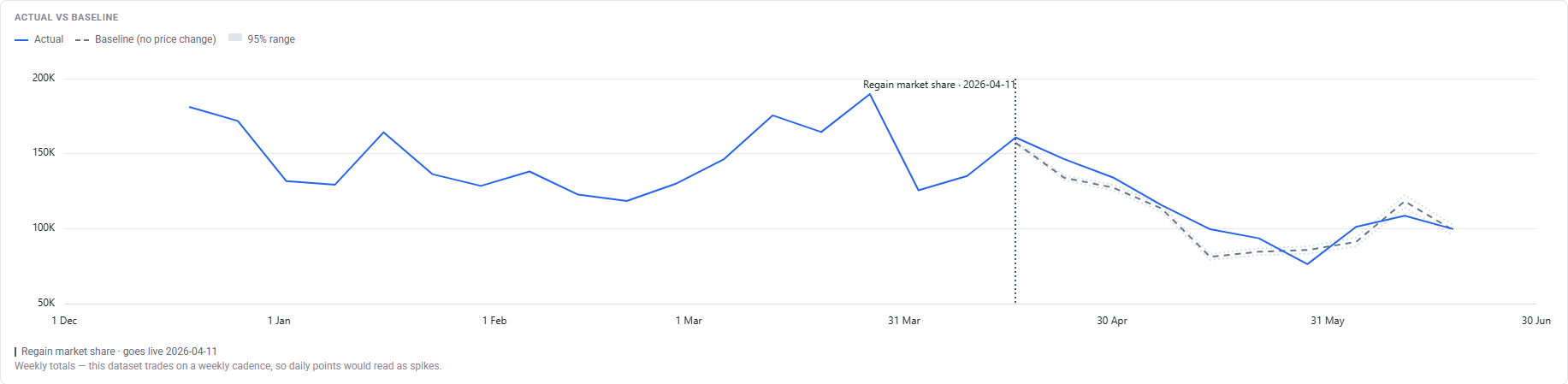
The headline chart plots the cohort's actual performance against the baseline. The gap between the two lines after go-live is the run's measured effect.
- The baseline leaves the actual line at go-live. Its first point sits on the actual's go-live point; from the next point on it is the model's own value, so the gap between the lines opens with the effect rather than with the model's day-one noise. The actual line runs back before go-live for context. In the weekly view the go-live point is the whole first week, so a week that already sold at the new prices shows its effect from the second point.
- The shaded band is the 95% range — it opens from nothing at go-live and widens to the range the table quotes by the window end. A gap inside the band is indistinguishable from an uneventful few weeks.
- Milestones are named. The go-live marker carries the workflow and date; if a later run re-priced part of the cohort, a second marker names it. Figures past that marker still describe this run alone, because the re-priced products have already left both lines.
Hover any line for its date and value. Datasets that trade on a weekly cadence are plotted as weekly totals; a note under the chart says so.
Price compliance

The compliance chart answers the precondition behind every figure: how much of the decision actually reached customers, and for how long? It plots the share of the cohort still at its published price, day by day — by % of prices, or by % of revenue to see how much of the business those prices govern.
- What counts at go-live — every price this publish put live, prices edited during review included. Only proposals that never reached Live count against compliance from the first day. A price another change took over on or before its go-live day never ran, so it leaves the measure rather than counting against it.
- What decays it — manual changes, ERP syncs and later publishes each end a price's live-as-published state on the day they take effect.
The two percentages under the chart — at go-live and at window end — are the fastest health check on the page. A cohort at 40% compliance is measured honestly — the overridden prices have left the figures — but the decision it measures is mostly no longer happening.
Put prediction and outcome in the same meeting
A few weeks after each publish, open the run, Refresh with latest data, and read each estimate against the predicted at publish row beneath it. Teams that do this every cycle learn how far to trust their own forecasts.
From here the loop begins again: adjust the action, run, publish — and the next run starts its own measurement.